

Africa’s game-development ecosystem is growing, but many smaller studios still work with limited art teams, limited hardware, and tight production budgets.
That creates a familiar challenge: building enough 3D content to make a game world feel complete can take far longer than designing the gameplay itself.
A prototype may need environmental props, furniture, tools, vehicles, architecture, and dozens of background assets before developers can properly test level composition and visual direction. Producing every object manually can slow experimentation, especially when one artist is responsible for modelling, texturing, lighting, and implementation.
AI-assisted 3D tools give developers another way to move from an idea to a testable asset before committing substantial manual art time.
The Real Cost of 3D Production Is Often Iteration
A small studio builds assets that eventually get changed or removed. A marketplace stall may block the player’s view. A machine may need redesigning because its scale feels wrong in-game. An environment prop may disappear when the level direction changes.
These abandoned assets still consume production time. For teams with limited resources, reducing the cost of the first version can therefore be as valuable as improving the final version.
Text-Based 3D Generation Works Well for Early World Building
When a developer knows roughly what an environment needs but does not yet have finished concept art, text-based generation can provide a useful starting point.
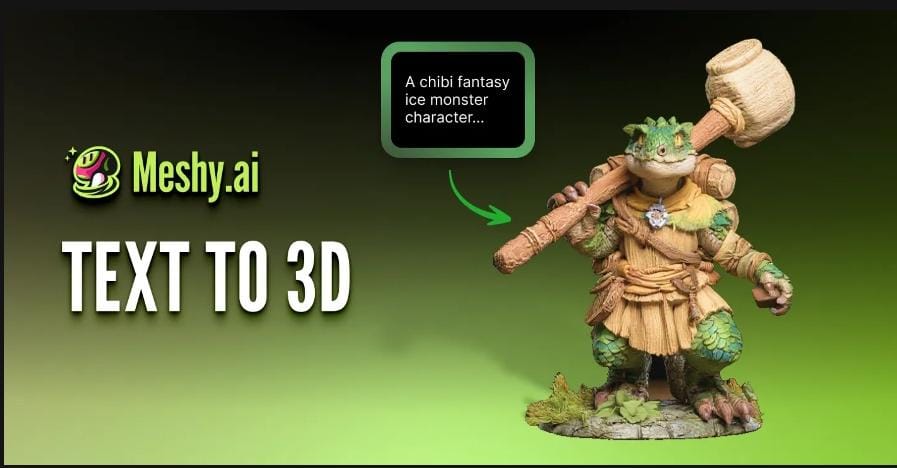
Using Meshy.ai, creators can describe an object and generate a 3D model directly in the browser. An environment designer might explore a weathered roadside generator, a stylized market table, a futuristic solar charging station, or a wooden fishing crate.
Several variations can be generated before the team decides which visual direction deserves further work.
Meshy offers a free tier for trying generation, while downloading models in formats such as GLB, FBX, OBJ, and STL requires a paid plan.
AI Is Most Valuable Before the Asset Becomes Expensive
During prototyping, the team is answering practical questions. Does the object fit the environment? Does its silhouette work from the gameplay camera? Is the scale believable? Does the art direction fit the rest of the level?
If the answer is no, the asset may be discarded. Faster generation can make that decision less costly.
Developers can create a first version, place it inside the level, and decide whether the idea deserves further work before spending hours polishing it.
Generated Assets Still Need Technical Review
A model can look convincing in a standalone viewer while still being unsuitable for gameplay.
Geometry Density
The mesh may contain more polygons than the object needs. A background crate occupying a small part of the screen may require much less geometric detail than a hero object shown in close-up.
Topology
Irregular surfaces, disconnected geometry, or unnecessary detail can make editing difficult. If the model will deform during animation, the structure around moving areas becomes especially important.
Materials and Textures
Check whether materials survive export correctly and whether texture resolution suits the asset’s importance. A large texture on a tiny background prop can consume memory without noticeably improving its appearance.
Test Assets Inside the Engine Early
Once a promising model has been exported, bring it into the target engine and examine it under real project conditions.
For teams working with Unreal Engine, the official Unreal Engine’s FBX Static Mesh Pipeline explains support for materials, textures, multiple UV sets, vertex colours, collision, and LOD information.
An object viewed alone provides little sense of scale. A chair may look reasonable until placed beside a character. A generator may appear too small, while an oversized decorative prop may disrupt movement through the level.
Test early, compare the asset with the player and surrounding environment, and adjust before investing additional art time.
Evaluate Readability From the Gameplay Camera
Players often see environment objects at a distance, while moving, under changing lighting, or partially obscured.
Silhouette and visual hierarchy can matter more than small surface details. A prop with a clear shape may be more useful during level development than a detailed model that becomes visually noisy inside the scene.
Evaluate assets from the intended gameplay camera and check whether they support navigation and the level’s visual direction.
Classify Assets Before Refining Them
An asset triage system helps a small team decide where human art time creates the most value.
| Asset category | Purpose | Refinement priority |
| Prototype only | Test composition or gameplay | Correct problems that prevent testing |
| Background asset | Populate areas viewed at a distance | Optimize geometry and textures |
| Interactive asset | Support player interaction | Check pivots, collisions, scale, and readability |
| Hero asset | Appear prominently or close to the camera | Invest in topology, materials, and visual finish |
This prevents teams from spending the same cleanup effort on every generated model.
Export Format Should Follow the Production Pipeline
Meshy supports formats including GLB, FBX, OBJ, and STL.
For game development, FBX can suit an established engine pipeline. GLB is useful for compact asset transfer and browser-based viewing. OBJ remains an option for static geometry when broad compatibility matters.
Choose the format according to the information the receiving tool needs, and verify the imported result.
Animation Needs a Separate Validation Pass
A static model can hide problems that only appear when it moves. If an asset will be rigged or animated, check how the mesh behaves around joints and deformation areas.
For characters or articulated objects, pay particular attention to:
- Shoulders and elbows.
- Knees and hands.
- Flexible mechanical joints.
- Areas where moving surfaces may intersect.
A model that looks correct in a neutral pose may still require topology changes before animation.
AI Tools Can Support Skills Development
Leadership has reported on Gamr Lab at the University of Lagos, highlighting the development of Nigeria’s gaming talent ecosystem.
For students and early-career developers, faster access to 3D assets can create more opportunities to experiment with level design, gameplay systems, lighting, and engine workflows.
Foundational 3D skills remain important. Generated assets can help students begin working with complete interactive scenes while continuing to develop those skills.
A Practical Workflow for Small Game Teams
Step 1: Define the Asset’s Role
Decide whether it is a prototype, background prop, interactive object, or hero asset.
Step 2: Generate a First Version
Use text or visual references to create an initial model.
Step 3: Inspect Before Export
Review geometry, silhouette, textures, and obvious structural problems.
Step 4: Test in the Game Engine
Check scale, materials, collision, lighting, and gameplay readability.
Step 5: Allocate Refinement Time
Discard weak ideas early and invest manual effort in assets that support the game.
For emerging studios, AI 3D tools can make it easier to test more ideas with the same team. That leaves more production time for art direction, gameplay, optimization, animation, lighting, and the details that define the final experience.
FAQ
Can Meshy generate 3D models from text?
Yes. Meshy’s Text to 3D workflow can generate an initial 3D asset from a written description.
Does Meshy run in the browser?
Yes. Meshy’s generation workflow and free 3D toolset are browser-based, reducing the need to install another application for those stages.
Are generated assets automatically ready for games?
Developers should review geometry, materials, scale, performance, collision, and engine compatibility before using them in production.
Why test the model in Unreal Engine early?
An asset can look fine in a viewer but behave differently under the project’s lighting, scale, camera distance, materials, and performance constraints.
Is AI 3D useful for experienced art teams?
Yes. It can accelerate early iteration so artists spend more time refining assets selected for production.
We’ve got the edge. Get real-time reports, breaking scoops, and exclusive angles delivered straight to your phone. Don’t settle for stale news. Join LEADERSHIP NEWS on WhatsApp for 24/7 updates →
Join Our WhatsApp Channel