

Sometimes you might have muted your phone and forgotten to unmute it, which is one of the reasons why we come to this article to teach you how to temporarily mute and unmute your phone on Samsung.
In some spring cases, you might have found it on Pleasant for your phone to be unmute which is why you will go ahead to mute the phone In most cases you forget to unmute it back there is this particular setting that available on Samsung devices or other related Android device which can help you activate temporarily mute for your device.
When we talk about a temporary mute is one of the Samsung tips that you would like to know or that is recommended you should know about.
Most Samsung tips or any tech related tips that are also related to Android tips as being shared on this particular platform which is recommended to check some of them out.
Just like if you wish to play around with your notifications on Samsung so as to know something like how to turn on flash notifications on Samsung you should be able to see it on this particular platform.
They share a lot of Samsung tips that will suit your imagination and that will help you improve the way your phone software interface operates.
Apart from getting this Samsung temporary mute for your device, it’s recommended to also look into other Samsung tips.
Now is the best stage to look into the particular aspects of this post so as to corrupt the knowledge that you wish to grab.
Meanwhile, looking into more features of Samsung, such as listening of amazing musicians song is am interested fact about Samsung phones.
How To Set Temporary Mute On Samsung
- For you to set a temporary mute on your Samsung device the first thing you need to do is to scroll down on your notification bar.
- Once you scroll down you will see a sound icon presented in the notification sector at the top side.
- Long press on the sound icon which should help you to provide other sound settings pages.
- You will be provided with a different option: click on mute.
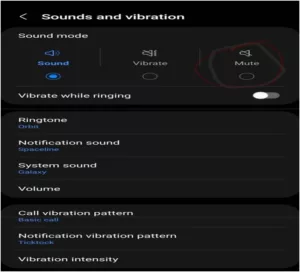
- After you select mute you should be provided with a temporary mute option.
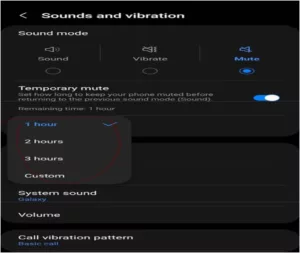
- Select it and select the hours that you would like your sound to mute which after the time is completed will unmute itself.
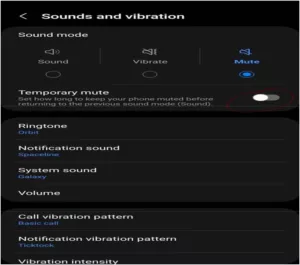
- You will need to turn up the temporary mute option settings so as to activate it.
- The next thing is to select the time range from 1 hour 2 hours, or 3 hours, or select the time custom mode.
This is just one of the best Samsung tips you should know about or any related Android tips you should know about so as to implement up to or temporary mode to your device I should help you mute your device after you forget or that should help you to carry out the operation on your device without need of forgetting to unmute your device again.
In addition, Samsung devices are also very amazing when it comes sounds and music playing. You can enjoy the best sound output in different ways when playing your favourite songs using your headsets, speakers or any music output devices.
Is better to know more about how your mobile phone operates due to the kind of smart life that we engage with on varieties of devices nowadays so it’s recommended to always look into most smartphone tips and tricks that will be suitable for any related Android or iOS device you might be making use of.
We’ve got the edge. Get real-time reports, breaking scoops, and exclusive angles delivered straight to your phone. Don’t settle for stale news. Join LEADERSHIP NEWS on WhatsApp for 24/7 updates →
Join Our WhatsApp Channel